

Book Farm Waste Collections Anytime with the Agri.Cycle App
At Agri.Cycle we are proud to be leading the way in farm plastic recycling with our easy to use booking app. Farmers can now request a collection from anywhere, whether they are out ploughing a field, doing the weekly shop or working in the yard.
The app allows you to:
Enter your contract number
Select the type of farm waste you want collected
Submit your collection request in minutes
Once your request is sent, it comes straight through to our team. We then contact you directly to arrange a convenient collection date, keeping the process simple and stress free.
This digital system has been designed for farmers who want a quicker and more efficient way to manage waste such as silage wrap, feed bags, netting, drums and tree guards. No paperwork, no waiting on the phone and no confusion about what you can or cannot book.
Agri.Cycle is committed to making farm waste recycling easier, more accessible and fully compliant with UK regulations. Our app gives you control and flexibility at a time that suits you, wherever you are.

If you are using Samsung Internet:
Open Samsung Internet and go to app.agricycle.co.uk
When the page loads, tap the three horizontal lines at the bottom of the screen
Select Add page to
Choose Home screen
Tap Add to confirm
The app icon will now appear on your home screen.
Open Samsung Internet and go to app.agricycle.co.uk
When the page loads, tap the three horizontal lines at the bottom of the screen
Select Add page to
Choose Home screen
Tap Add to confirm
The app icon will now appear on your home screen.
If you are using Safari:
Open Safari and go to app.agricycle.co.uk
Once the page has loaded, tap the Share button at the bottom of the screen (square with an upward arrow)
Select Add to Home Screen from the options
Tap Add in the top right corner
The app icon will now appear on your home screen.
Open Safari and go to app.agricycle.co.uk
Once the page has loaded, tap the Share button at the bottom of the screen (square with an upward arrow)
Select Add to Home Screen from the options
Tap Add in the top right corner
The app icon will now appear on your home screen.

If you are using Google Chrome:
Open Google Chrome and go to app.agricycle.co.uk
When the page loads, tap the three dots in the top right corner
Select Add to Home screen
Tap Add on the pop-up
Tap Add again to complete
The shortcut will now be visible on your home screen.
Open Google Chrome and go to app.agricycle.co.uk
When the page loads, tap the three dots in the top right corner
Select Add to Home screen
Tap Add on the pop-up
Tap Add again to complete
The shortcut will now be visible on your home screen.
Step 1:
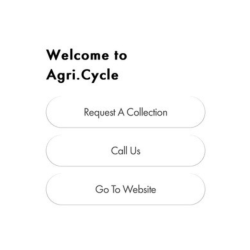
Open the Agri.Cycle app. You will see three options on the home screen. To request a collection, select “Request a Collection.”
Step 2:
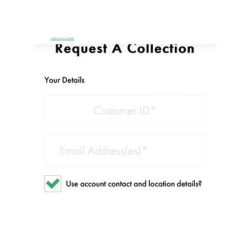
Enter your email address and customer Contract number to continue.
Step 3:
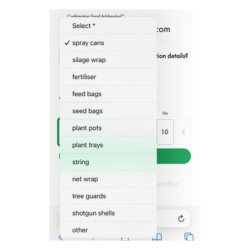
Choose the items you would like us to collect from the list provided.
Choose the items you would like us to collect from the list provided.
Step 4:
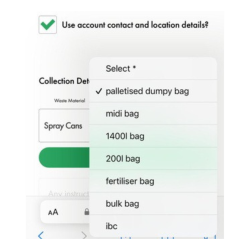
Select the bag size and quantity using the drop-down menu and quantity box. If you have more than one type of waste, you can add another line.
Select the bag size and quantity using the drop-down menu and quantity box. If you have more than one type of waste, you can add another line.
Step 5:
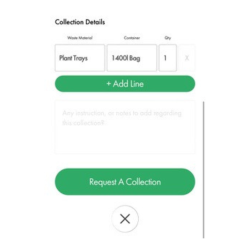
Once all the required fields are completed, click “Request a Collection.”
Your screen will turn green to confirm that the request has been submitted, and a confirmation email will be sent to you.
Your request will automatically be sent to the correct Agri.cycle franchise, who will contact you to arrange the collection date.
Once all the required fields are completed, click “Request a Collection.”
Your screen will turn green to confirm that the request has been submitted, and a confirmation email will be sent to you.
Your request will automatically be sent to the correct Agri.cycle franchise, who will contact you to arrange the collection date.